Why emoticons & emoji are good news for English (well, maybe)
August 27, 2013 § Leave a comment
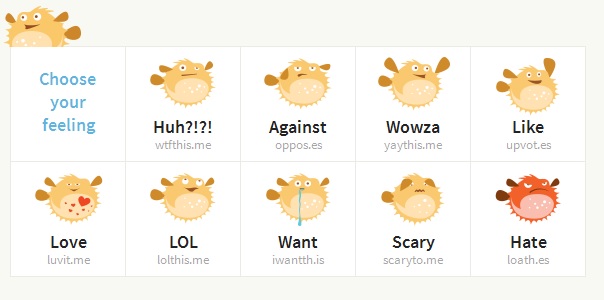 This article, published on Wired last week, makes me beyond excited. At first, I thought “The ‘Mood Graph’: How Our Emotions Are Taking Over the Web” was going to be another one of those “social media is rendering us incapable of human interaction/turning us into unfeeling device-addicted automatons/ruining our lives/etc.” pieces.
Instead, author Evan Selinger (a Fellow at the Institute for Ethics and Emerging Technology) takes a totally different stance. His argument: The written word, whether it appears on a postcard or in a tweet, is already a step removed from spoken communication. Whenever we write, we’re essentially translating our thoughts into the words and phrases available to us. (We do this when we speak, too, of course—but in writing, we usually strive to be more brief and linear than in casual speech.)
So what if digital communication’s latest little embellishments—emoticons, emoji, and the newly available Bitly for Feelings—could actually help us understand each other’s written musings better? Personally, I’ve come to think of these as a kind of punctuation, adding meaning to otherwise ambiguous statements.
Says Selinger, “How many times have you heard, for example, people observe (or console others) that ‘Oh, well, you can never really read tone in email?’”
Yes, forcing users to choose from a drop-down menu of a few dozen grinning and grimacing smileys might limit or simplify the ideas we can express. But wait, doesn’t language do the exact same thing? It’s well-known that there are many emotions for which English has no words.
Selinger explores the social and political implications of confessing our emotions to a blinking status bar. (There’s no doubt a company like Facebook will use its growing “mood data” to its advantage.) This is the first I’ve heard a writer frame emotional (pictorial?) communication this way. But I have a feeling it won’t be the last.
As sharing new aspects of our lives becomes more commonplace, I’ll be interested to see how these add-ons to our language shape and inform the way we communicate.
SEO Sucks When You Have a Common Name. Here’s What to Do About It.
August 20, 2013 § Leave a comment

When I was in high school, I dressed up as Where’s Waldo for Halloween. Little did I know it would be, like, a metaphor for how I’d later feel on the Internet. I’m deliberately NOT alt-tagging this with my name though, because this is actually kind of embarrassing.
Sometimes, I’m glad my name is a timeless classic. I’m thankful my parents didn’t brand me with something impossible to pronounce. Or embarrassing to write on a resume (I’m looking at you, Diamond and Princess). But there are times when I envy the Adriannes, Zoeys, and Clementines of the world.
Trying to achieve personal SEO is one of those times.
SEO is tough for anyone. But if you’re a Matthew or a Kate, or, God forbid, you had the misfortune of being born a Jones, fighting your way onto page 1 of Google is a serious uphill battle.
In a way, this feels kind of inevitable.
It starts in kindergarten. You become known as “your name-plus.” You answer to your full name or a nickname while everybody else is on a first-name basis. I had a teacher in elementary school who, unsure how to distinguish between two of my peers and I, settled on “Mary 1,” Mary 2,” and “Mary 3.” (If that doesn’t screw with a budding sense of self, I don’t know what does.)
Then came the screen name era. As anyone with a blah name will tell you, you can forget about scoring a username with any iteration of the words in your name, sans a string of numbers and random underscores. And there’s no chance you’ll get to use the same handle on AIM that you have on Hotmail.
I’m sure this is the only explanation for the idiotic usernames I kept using until way after it was cool.
Now, Mary 2 is expected to stand out in the wide world of Google—a pool just a teeny bit bigger than my third-grade classroom. If you’re like me, chances are somebody’s already snapped up www.yourname.com. (In my case, that domain’s lucky owner is a photographer from Nova Scotia who specializes in weirdly colorized semi-nudes. Go figure.)
If you’re just starting to stake your claim on the Web, there’s not much you can do about others who got there first. But there is hope, sort of.
Here are a few resources I’ve found helpful on personal branding and SEO:
- 3 tips for personal SEO, Marketing Sherpa
- 14-point checklist to Dominate Your Personal Brand on Google, KISSmetrics
- Seven Ways Writers Can Build Online Authority with Google+, Copyblogger
Basically, follow general best practices when it comes to personal SEO. But do it better than your name-clones.
As far as special tips for the plain-named, my teachers may have been right all along: tack on something to make it unique. Add your middle initial, a suffix, or a title to refer to yourself professionally. Grammar Girl is the first one that comes to mind (though I’m not sure why Mignon Fogarty uses it—she hit the unique-name jackpot).
I’m just starting to implement some of these guidelines, like adding my name to site meta titles and images and optimizing my social profiles. Check back with me in a few months. I’ll let you know how it all works out.
Or better yet, just Google me.
[UPDATE: I just wanted to add a link to this article published on Mashable last week. Another way to narrow the results Google returns for your name? Get hitched. “By adding a married name to your maiden name, this will create more search results from Google and keep the original SEO relatively intact. Even if you hyphenate the two last names, search results will go hardly unaffected if the maiden name is still next to your first name.” ]
You’re probably using Google wrong
August 5, 2013 § Leave a comment
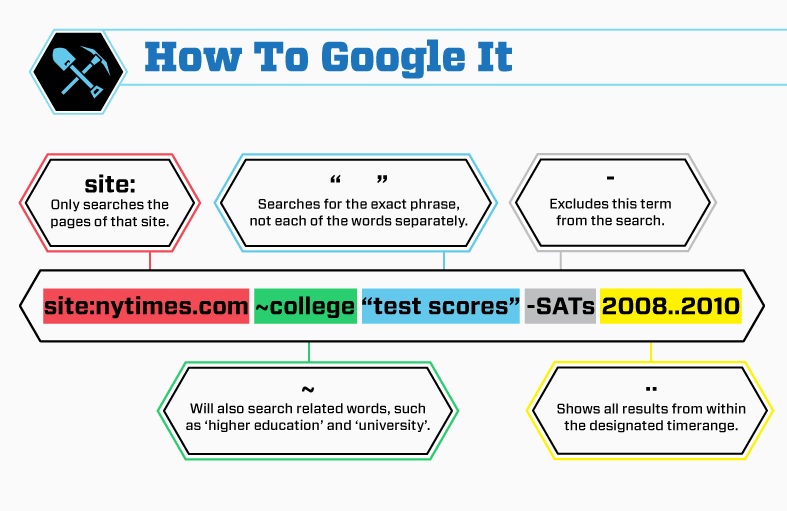
I so wish I’d known these tricks when I was writing my college thesis—but I’m happy to learn them now.
Who knew you could ask Google to search only on a certain site? Or only search for specific types of files? Not this girl. Just in time for back-to-school, here’s an awesome infographic by HackCollege on how to “Get More out of Google.”
So long, Google Reader
March 26, 2013 § 1 Comment
 On March 13, Google announced it will be shutting down its Reader service. And it’s caused disappointment in all corners of the blogosphere. I’m right there with them. But to be honest, before the announcement, I didn’t realize there were so many other loyal Reader fans out there. I wouldn’t have been surprised if Reader’s demise had occurred quietly and without complaint.
I started using Google Reader late last year. My time on the Internet wasn’t being well spent, I’d decided. I hate wasted time—and I needed a fix. I remember the feeling of wanting to read or learn something worthwhile (you know, besides what my friends ate for lunch that day)—and not knowing quite where to look.
I wanted a way to keep up: with everything from news sources to essayists I liked to psychology research to trends in the writing and publishing worlds. And above all, I wanted it to be efficient. I’ll admit, I wasn’t sure what I was even supposed to do with an RSS feed before installing Reader. But I had a feeling it was just what I’d been looking for.
It didn’t take long to make me a convert. Reader is quick, easy way to find and follow everyone from the lone blogger the news powerhouse, all in one place. But it’s more than that. Reader is like a back door into the world of news and commentary (or, I suppose, whatever world you build for yourself with your own gathering of feeds). Free from pesky ads and distracting sidebars, Reader is a spare, uncluttered gathering of content, hand-delivered just for you. A meticulously organized filing cabinet of newspaper clippings, turbocharged for the digital age.
For me, Reader means that great storytelling doesn’t end on the page. These days, I’ll have hardly put down an essay or finish a blog by a writer I’ve just discovered before I open up Reader and track down her work. Search archives and devour more. And get notified every time a new unread item appears, boldfaced and waiting, in my queue.
Google Reader will cease refreshing for good on July 1. And with it, millions of invisible threads connecting readers with content will go quiet. I won’t abandon my subscriptions or stop following writers, of course (I started using Feedly, another RSS service, even before the Reader shutdown announcement).
But Reader changed how I connect with publications, opened up a world, and indeed, transformed the way I use the Internet. And when it comes to RSS readers, I’ll never forget my first.
 MARY GABLE